

Garmin AMOLED Screen burn In – tales of woe and how to avoid being another statistic
LED industry experts reassure us that “AMOLED Burn In is a thing of the past“. Try telling that to these three unlucky Garmin Epix 2 owners. Let’s discuss the issues and what to do about it.
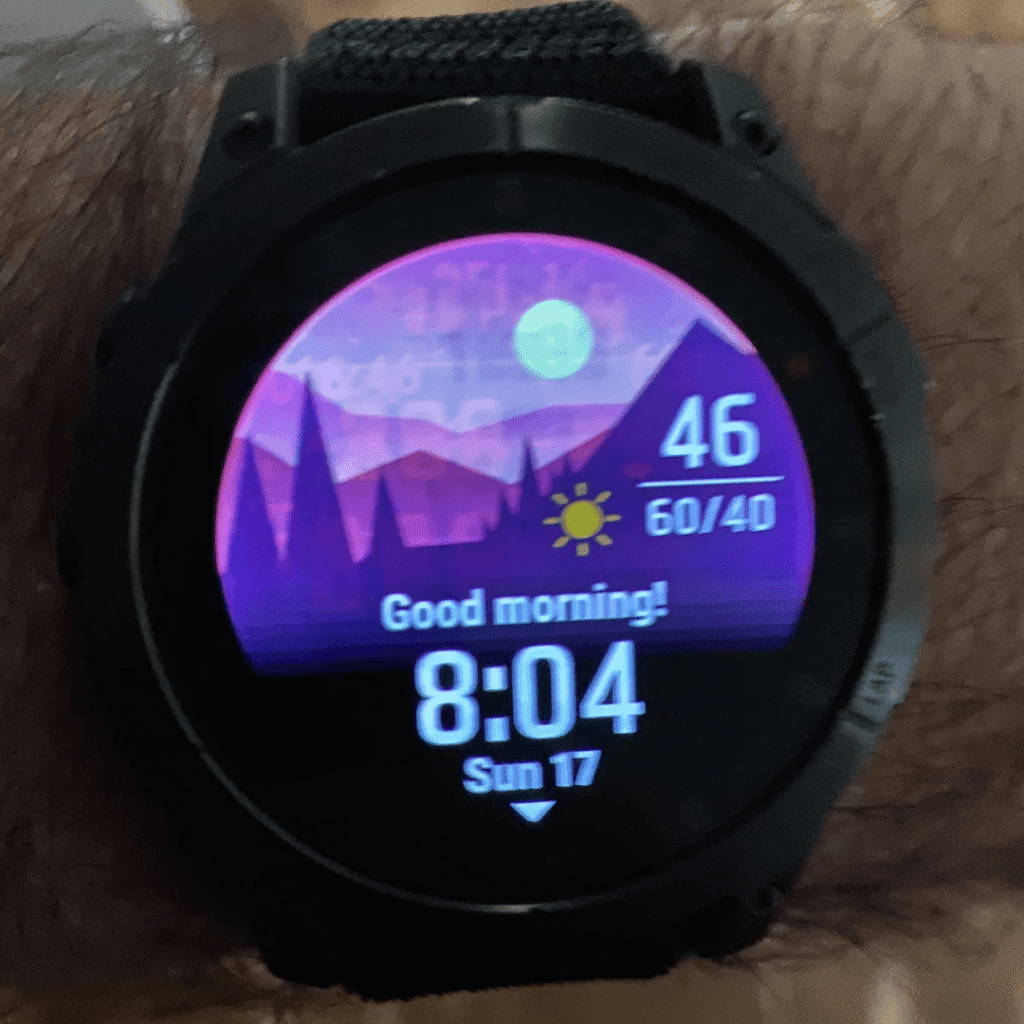
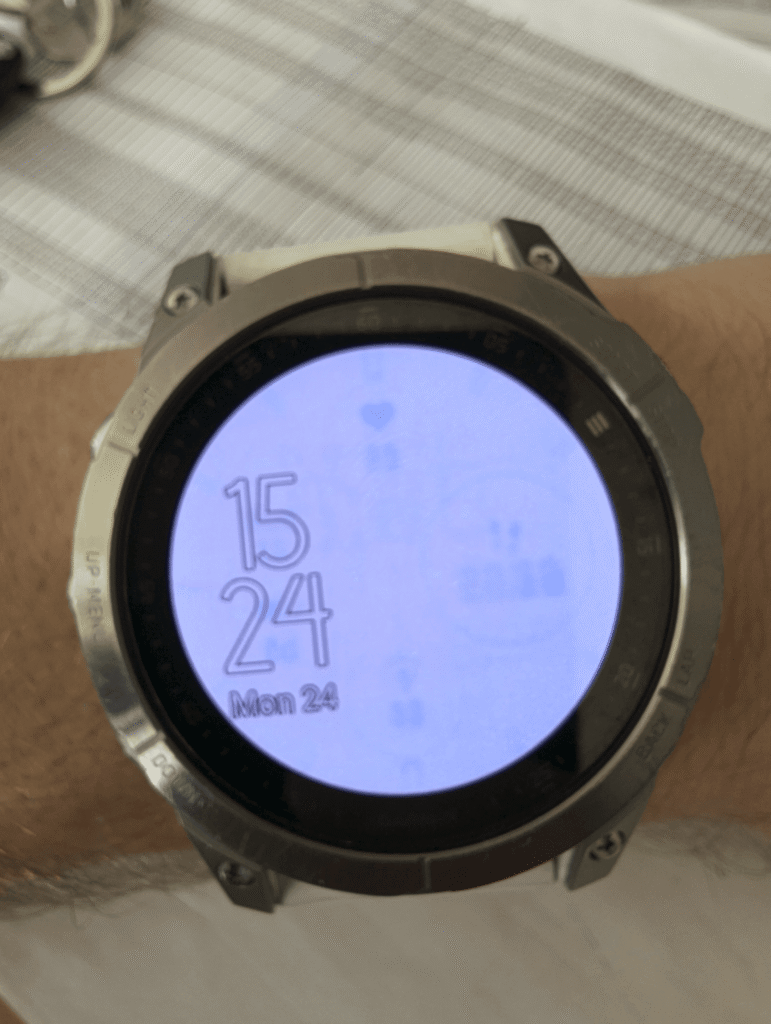
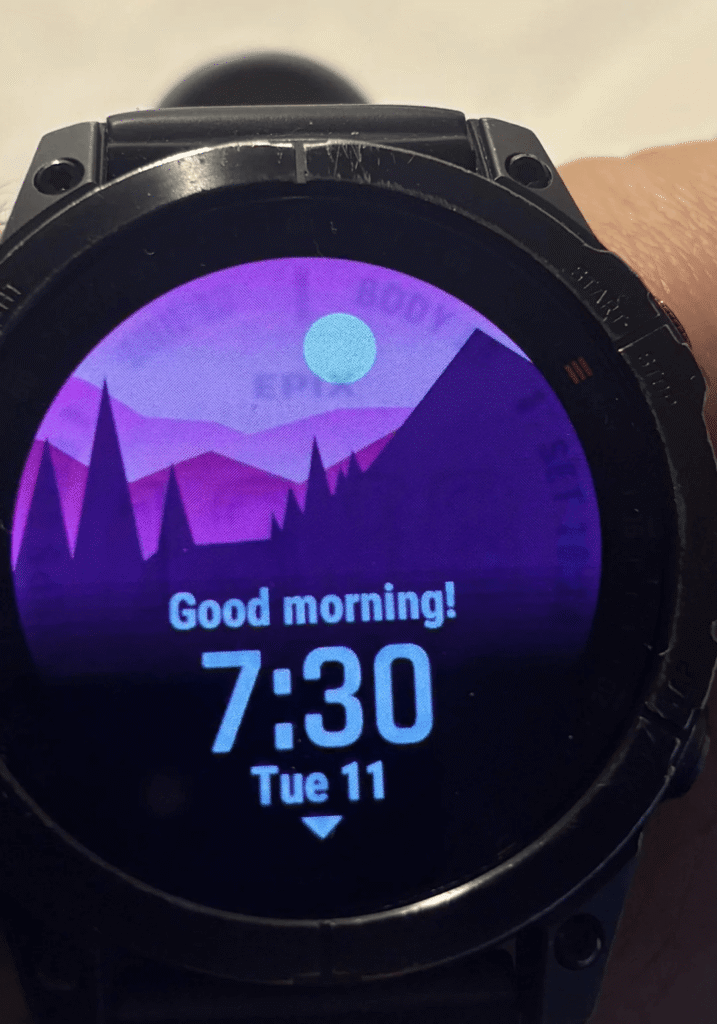
The Facts
Burn-in is an inherent risk with all AMOLED displays, including those used in smartwatches. However, its severity and likelihood depend on several factors, including usage patterns, display settings, and how well the manufacturer mitigates the risk though software.
AMOLED screens work by individually lighting up organic pixels. Over extended periods, these organic materials degrade at different rates, made worse when displaying static images for prolonged periods. This results in the ghosting effect you can see in the pictures above. Remnants of previously displayed images, usually watch faces, remain visible.
Q: Is Burn-In Inevitable?
Yes and no.
- Yes, in the long run: All OLED/AMOLED displays degrade over time, making burn-in an eventual reality if used long enough.
- No, for most users: Many people will replace or upgrade their smartwatch before a noticeable burn-in occurs.
Q: What Worsens my chances of ruining my $1000 watch?
Simply put, you run a higher risk if you have a static, bright image on any part of the display for a long time.
- Always-On Display (AOD) – Keeping the screen on 24/7 with static elements accelerates degradation.
- High Brightness Levels – Brighter pixels degrade faster.
- Static Screen Elements – Persistent images like watch faces, status bars, and widgets “burn in” faster.
- Long-Term Use – Devices worn daily for years will inevitably show some wear on the display.
How Manufacturers Reduce Burn-In
Garmin, Apple, and other smartwatch makers implement various techniques to delay or minimize burn-in:
- Pixel Shifting – Slightly moves UI elements to avoid prolonged static images.
- Auto-Dimming – Reduces brightness in certain conditions.
- Screen Timeouts – Turns off the display after inactivity to extend lifespan.
- Adaptive UI Elements – Some UI elements fade or change position subtly over time or in certain conditions.
Does your 3rd party CIQ watch face override any of these mitigation strategies?
Preventing or Delaying AMOLED Burn-In
You bought a Garmin watch with a beautiful AMOLED display to show it off in its glory. As you’ve probably guessed, the solution is to NOT show it off in all its glory!
- Limit Always-On Display: Use the display only when necessary.
- Lower Brightness: Use auto-brightness or manually reduce it.
- Change Watch Faces Regularly: Avoid static elements that stay on-screen.
- Enable Battery Saver Mode: Many watches reduce display activity in this mode.
- Use Darker Watch Faces: AMOLED pixels degrade faster when showing bright colours.
Q: If I get AMOLED burn-in, can I get a Garmin replacement
You have a good case, especially if this happens within 2 years, regardless of how you used your watch brightness settings and watch faces. After two years things get trickier.
In the UK, the manufacturer warranty does not compromise your legal rights under the Consumer Rights Act (2015). To get a remedy you must show:
- AMOLED screen burn-in is a design flaw or premature defect rather than expected ageing. (?)
- The product did not meet reasonable durability expectations for its price and intended use.
- Other users have experienced similar premature burn-in, indicating a possible widespread issue. (see photos above!)
If you had bought a $50 watch 3 years ago, I doubt you have a case. However, if you’ve spent £1000 on a watch, expecting it to last more than 2 years is reasonable.
Take Out
AMOLED burn-in is a real issue on Garmin watches. It just takes quite a long time to materialise. It will likely take over two years for burn-in to be noticeable.
As Garmin Epix Gen 2 was released on Jan 18, 2022, I expect these stories to become more common. If it happens to you after 2 years, your only recourse will likely be directly with Garmin. You should outline your problem with pictures on Garmin and Reddit forums as evidence for others and then stress to Garmin the reasonable durability expectation whilst also citing other owners’ examples of the problem.
Good luck.
If it has not happened to you, turn down the brightness and change the screensavers regularly.
Just send it to Garmin and you will get a new Watch. Even when you dont have warranty anymore. Customer service is excellent at Garmin.
yes my experience of garmin customer service is generally great in the uk. from stories i hear it does vary in other countries
for most of the feedback over all Amoled family watch on the Garmin forum, this is their reply or good experience with Support.
Garmin take care about this issue even outside the warranty period. Great reaction !
I’m not sure this is wrote somewhere in their warranty policy 😉
Garmin won’t replace all watches with burn-in for free. I had a Venu with severe burn-in and they offered me a Venu 2 at a reduced cost, which was still ok seeing that the Venu was out of warranty for a while already.
Their user manual also states that burn-in is normal, so they’re covering themselves and might deny a claim.
I’m less likely and more cautious to buy a used Amoled watch than a MIP one due to the risk of burn-in.
Hopefully MicroLED will become more affordable soon 🙂
Not using AoD mode reduces the risk of burnout to almost zero.
The solution is simple. Unfortunately, people want to have AoD by force, without analyzing how organic diodes work. Even if the manufacturer provides such a possibility, you need to have knowledge, using new technologies. Then the problems disappear.
Using a feature provided by the device manufacturer as intended should not result in failure of the display. If you have burn-in then it is a design defect. It’s not acceptable to say AOD mode makes it happen.
At least one of those burn-in images is the stock Epix watch face. That should be a warranty replacement of an equivalent device or heavily discounted upgrade.
good point about the stock face
One of our most well known reviewers (no names mentioned), always states that burn in is just not a thing anymore…but every month he has a new watch on his wrist.
If someone buys an AMOLED device, they shouldn’t have to limit their use. Some people with older garmins are using them for 5years+ (I’ve seen people saying 8-10 years). The reality with these AMOLED devices is that we can expect maybe half of that. I wish no-name reviewer mentioned above could communicate that to his audience
not sure who you mean, I delve into research in microLED/OLED forums and other products that i don’t especially mention on this blog. it’s not especially relavent in any case as its the responsibility of garmin to make this clear.
regardless, you are correct tht you shouldn’t have to limit your use. (unless that is made clear in the sale)
Here is a quote from one of his many comments:
“By and large, short of some per-unit defect, AMOLED display burn-in just isn’t an issue in modern watches. End of story. All these companies have a vast array of tools in their toolbox to mitigate this, and they use them.
In terms of ‘correct’ here, I’m talking about the most ideal settings, and again, Garmin offers all of these ideal settings and suggests them as defaults. But if someone chooses something else, then, it won’t be ideal – and you could get less battery life (but it won’t hurt the display)”
I just hope that AMOLED doesnt completely take over the fitness wearables market. Im a Polar user and unless they announce something in the next year that is MIP, I will have to look elsewhere. I dont want to change my product every 2 years or limit the way I use it
I don’t want to single out dcr here. Others who should know better in their domain of expertise have said similar things
regarding amoled taking over the market. i’m afraid that is going to happen until there is a similarly ‘bright’ replacement tech (like microLED). MIP-like tech will probably continue to exist at the peripheries.
Yeah DCR is the one who convinced me to buy Epix which I sold after a month and returned to a Fenix. Basically constantly dimming AMOLED can’t replace a MIP screen for real outdoor use and the reason I switched to Garmin from Apple back in 2019 was the freaking wrist gesture and the fact that I didn’t see anything in bright sunlight without it. Try to check your stats during ski mountaineering while holding the poles. Or on a bike by just glancing at the wrist. So him and other reviewers saying that screen burn-in isn’t an issue and AMOLED is just as good under bright sunlight are simply missing the point or they like to do funny things with their hands while running, hiking, biking you name it. And those saying that you’ll probably just replace the watch after two years don’t give a shit about environment.
dcr is an excellent skier, i would have thought his advice on issues around that would be sound.
to be fair: none of us reviewers will have had 3-4 years of continuous usage of a single watch in order to experience burn-in. they haven’t been around long enough. so advice from reviewers at best comes from research that anyone can do or assurances from vendors or other industry experts in the display tech field
Man, I go out into the desert for a few days and come back to a crapstorm….
Look, I’ll defend what I said before – burn-in simply isn’t an issue for the overwhelming vast majority of users in today’s displays. Factually, it isn’t. If it was, we’d hear more than just an occasional user having the issue. Be it Apple, Garmin, Samsung, or otherwise. Obviously, when you ship millions of units of anything, you’re going to have a few units that fail in some capacity (be it due to hardware or software issues). If we want to go back and complain about Venu 1 device from 2019 before Garmin learned a lot about AMOLED displays (software and hardware-wise), fine, but we all know that’s not what we’re talking about in 2025.
If it were a real legit widespread issue (even a 2-3% issue) in 2024/2025, all we’d hear about is burn-in issues. Especially in the case of Apple’s numbers, but these days, also Garmin’s numbers. The numbers don’t lie here. Be it Reddit comments, Garmin forums comments, or comments on sites like this or mine (or other social media channels). I think people forget the scale of tens of millions of units of watches sold between Garmin & Apple on an annual basis here, let alone Samsung/Google and others. If we were having legit burn-in issues at scale (even 2-3% scale), we’d be talking thousands and thousands of posts.
As per the article, the burn-in issues might perhaps start to become more commonplace. Those that have surfaced so far appear not to be from defects but rather perhaps only from people doing unusualy harsh screen usage (AOD, high brightness, fixed watchface).
Not sure how you or I could have tested something that only occurs years down the line. If assurances have been made by suppliers then those need calling out.
@Tom
If you actually switched from Apple to Garmin, you shouldn’t have been surprised by the (alleged) limitations of an AMOLED display. So maybe you should re-evaluate your personal lessons learned process before blaming other for your bad choices. I have been using Garmin AMOLED watches since the Venu came out and my Epix as well as my current Epix Pro have been great in terms of display readability in almost all light conditions, even with a slightly dimmed display during activities.
Tech obviously has progressed since then so if a reviewer tells me it’s even better than MIP display I trust him to be exactly that. Little did I know you actually still have make that silly gesture in order to see anything in bright sunlight. And also when he says screen burn-in isn’t an issue, many consumers can be misled into thinking it will last just like a MIP Fenix for many many years in AOD mode and it turns out to be far from the truth.
I suggest you just read or watch his reviews to the end and don’t ass-u-me anything. In each of his early Epix reviews and videos he stated that you have to flick your wrist in order to activate the screen. And I can’t recall that he ever stated that you can wear your watch 24/7 for years in AOD with the same watch face without running the risk of burn in. I know, blaming others for the mistakes one makes is an time honored tradition…
Well from what I remember he said numerous times that it’s clearly visible in sunlight, better than MIP and due to pixel shifting there is no risk of a burn-in. I’m not blaming him for my mistakes, after selling the almost new Epix I got Fenix 7 for the same price. I’m only saying that he should reconsider his judgement and stop telling people that AMOLED is the eighth wonder of the world because the tech obviously still is limited. BTW I really like Ray and enjoy watching his reviews, I just don’t agree with him on this one and I’m surprised he keeps claiming that burn-in is not an issue.
Not that old trope again… None of DCR,T5KR and other reviewers have ever said that OLED is the end all of display technologies, superior in _every_ espect or the best choice for _everybody_ or _all_ scenarios.
What they have said is that OLED is superior or equivalent in _most_ (initially many, nowadays almost all) scenarios and for the _vast majority_ of users. That has been borne out by the market: consumers mostly choose OLED watches over MIP or other technologies.
Every technology has limitations, some of which get eliminated or reduced or mitigated through technological progress – eg burn-in appears to be almost a non-issue at this point (Note: does not mean it doesn’t happen at all, but the number of occurences and/or required conditions are so rare that it is peactically not important – and those few instances can be easily and economically addressed through replacements or similar).
At this point, OLED displays are clearly the superior and preferred choice for the vast majority of cases. But there will probably always be a small number of edge cases (watches on bike handlebars) or users who prefer something else/niche technologies (MIP, analog hands, sundial…).
FWIW, all my OLED watches since the Epix Gen 2 have performed perfectly fine and notably superior to MIP ones in _all_ conditions including bright equatorial sun, ski touring etc.
yes and in my opinion oled is the best tech for me too.
i’ve hardly previsouly mentioned burn in (never having experienced it) but certainly will do in the future and, obvisouly, i have in this artcile
There is a reason MIP was used in this kind of watches and the first place. And like I said a thousand times, while I appreciate the choice of Amoled for those who want to live with the tradeoffs, these are very real. And yeah, there’s been some gaslighting about it from some reviewers. “Oh, it’s super visible in all conditions, oh battery life is so great now, oh, you get used to the gestures”. OK.
MIP was used because on balance it was the best avaialable _at the time_.
Technological progress has changed that and _at this point_ OLED displays are on balance far superior. Again, there are some llimitations (fewer and fewer) and some edge cases, for most applications and users these are not relevant or are more than offset by the other advantages of OLED.
Advantages which are nice colors and clear display in dimmer conditions? These are watches, not phones. I glance at them couple of times a day and when I do, I don’t wanna do funny stuff with my hands as if I were dancing to techno. Stop telling people you actually can see the screen (especially in polarized lenses) in bright sunlight without waving your hand.
also classed as jewellery #Pretty
MIP is the best technology for me… so far.
I’ve had a Marq Gen 2 for 2 years and it has no sign of screen burn in even though I keep it in ‘always on’ mode permanently. Whilst there’s no denying OLED looks prettier, the MIP on my Gen 1 was better for outdoor activities, especially cycling, for battery life and for simply telling the time. In bright sunlight, the dimmed ‘always on’ is effectively off; you have to twist your wrist or press a button to see the time or your activity display. Presumably, that’s why Garmin stuck with MIP for the Edge 1050 (although the LCD is now transmissive rather than transflective).
Will microLED be better still?
technically better images for sure – resolution and brightness, but how much better makes a difference to the viewer? maybe better resolution would aid map display?
i suspect the advantages of microLED are linked to power, probably also pixel by pixel control to support strategies to reduce burn in.